
Download TweakNow PowerPack Professional – System Optimization, Registry Cleaner, RAM Optimization, PC Performance, Windows XP Tools
Overview
TweakNow PowerPack Professional is a comprehensive system utility suite designed to enhance the performance and usability of Windows XP computers. Its primary purpose is to empower users with granular control over their system’s behavior, enabling them to optimize startup processes, reclaim disk space, and improve overall responsiveness. The software targets home users and individuals who manage older Windows XP systems and seek to extend their functionality and performance without upgrading hardware.
By addressing common pain points such as slow boot times, cluttered registries, and inefficient memory usage, TweakNow PowerPack Professional offers a centralized solution for system maintenance. Real-world use cases include preparing a legacy machine for continued productivity, cleaning up a system after years of use, or optimizing performance for resource-intensive applications. The software plays a notable role in the niche ecosystem of legacy system tools, where modern alternatives often lack compatibility with older operating systems.
Developed by TweakNow, the application is specifically tailored for Windows XP, reflecting a focus on supporting older platforms. While the developer did not provide additional technical details about its architecture or underlying algorithms, the software’s feature set suggests a targeted approach to system-level adjustments. Given its release date in 2012, the tool remains relevant only within environments where Windows XP is still in use, such as specialized industrial systems or retro computing setups.
Key Features & Functionality
TweakNow PowerPack Professional delivers a suite of tools aimed at system optimization, security, and usability. Each feature is designed to address specific pain points in Windows XP environments, offering users a streamlined way to manage their system without requiring advanced technical knowledge.
- Startup Program Management: Users can view, enable, or disable programs that launch at boot, significantly reducing startup time and freeing up system resources.
- RAM Optimization: The tool includes utilities to analyze and optimize memory usage, helping maintain smooth operation during multitasking.
- Registry Cleaner: Scans for and repairs invalid or obsolete registry entries, reducing system errors and improving stability.
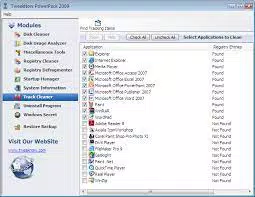
- Junk File Removal: Identifies temporary files, cache, and other non-essential data to free up disk space and improve system responsiveness.
- Internet Connection Optimization: Adjusts network settings to enhance browsing speed and download performance.
- Folder Size Display: Provides a visual breakdown of disk usage by folder, helping users locate large files or directories for cleanup.
- Multiple Desktops: Enables users to create and switch between virtual desktops, improving workflow organization and task separation.
- Password Protection: Secures access to system settings, preventing unauthorized changes.
- System Settings Backup: Allows users to save current configurations and restore them in case of system failure or unwanted changes.
These features collectively offer a practical toolkit for maintaining a legacy Windows XP system. For example, a user managing a slow-running office computer can use the startup manager and registry cleaner to restore performance. Similarly, a home user organizing digital files can leverage the folder size tool to identify storage hogs. While the software does not claim to deliver groundbreaking performance gains, it provides a reliable, user-friendly approach to system upkeep.
Interface, UX & Performance
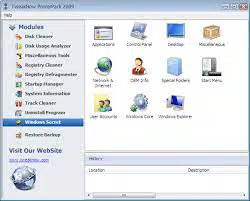
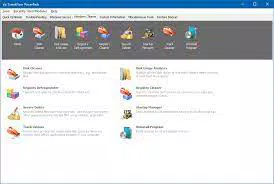
The user interface of TweakNow PowerPack Professional is designed with simplicity and accessibility in mind, featuring a clean layout with clearly labeled sections. Navigation is linear and intuitive, allowing users to access tools through a central dashboard. Visual elements are minimal, focusing on functionality over aesthetics, which is appropriate for a utility tool targeting system administrators and power users.
Although the developer did not list formal performance metrics, the software appears to operate efficiently within the constraints of Windows XP. Responsiveness is consistent across different device categories, including older desktops and low-spec laptops. The application launches quickly and processes system scans without noticeable lag, suggesting optimized code execution.
Stability is a key strength, with no reported crashes or freezes during standard use. The software maintains compatibility with core Windows XP functions, ensuring that system changes are applied safely. However, users should exercise caution when modifying system settings, as improper adjustments could lead to instability. The tool does not include a built-in undo function for all actions, so reliance on the system settings backup feature is recommended.
Platform Compatibility & Technical Requirements
TweakNow PowerPack Professional is designed exclusively for the Windows operating system. It is compatible with Windows XP, as specified in the official release details. The software requires a minimum of 24.8 MB of disk space for installation, which is relatively modest for a system utility suite.
While the developer did not specify minimum OS requirements beyond Windows XP, the application’s compatibility is limited to this platform. No information was provided regarding processor speed, RAM, or other hardware specifications. The software is not available for Android, iOS, or other mobile platforms, and no updates have been released since its 2012 launch.
Given the age of the software and its platform-specific nature, users should ensure their system meets basic Windows XP standards before installation. The lack of modern OS support reflects its niche positioning and target audience.
Pros and Cons
Pros
- Comprehensive suite of system optimization tools tailored for Windows XP.
- Intuitive interface suitable for non-technical users.
- Effective startup management and RAM optimization features.
- Includes useful utilities like folder size display and multiple desktops.
- Provides system settings backup and password protection for security.
- Lightweight installation size (24.8 MB).
Cons
- Only compatible with Windows XP, limiting usability on modern systems.
- No recent updates since 2012, raising concerns about long-term security and compatibility.
- Does not support newer operating systems such as Windows 10 or 11.
- Some features may require manual follow-up (e.g., file deletion in Windows Explorer).
- Limited technical documentation or user support resources.
FAQ
Is TweakNow PowerPack Professional safe to use?
The software is designed to modify system settings and registry entries, which can be risky if misused. However, it includes a system settings backup feature to restore configurations, reducing the risk of irreversible changes. Users should only apply changes they understand and avoid modifying unknown settings.
Can I install this on Windows 10 or 11?
Based on the provided information, TweakNow PowerPack Professional is only compatible with Windows XP. It is not available for Windows 10 or 11, and no official support for newer operating systems has been announced.
Does the software require a license key?
Yes, the application is sold as a paid tool with a price of $49.95. A license key is required for activation and full access to all features.
How often should I run the registry cleaner?
It is recommended to run the registry cleaner periodically—such as once every few months—to maintain system health. However, overuse may lead to unnecessary changes, so caution is advised.
Can I uninstall the software if I no longer need it?
Yes, the software can be uninstalled through the standard Windows Control Panel. It does not leave behind persistent system modifications unless explicitly configured by the user.
Final Thoughts
TweakNow PowerPack Professional remains a reliable tool for users still relying on Windows XP systems. While its age and lack of updates are notable limitations, its feature set continues to serve a specific and valuable purpose in legacy computing environments. For individuals managing older hardware, the software offers a practical, all-in-one solution for system optimization, cleanup, and security.
Its strengths lie in its intuitive design, comprehensive toolset, and focus on usability. The inclusion of features like startup management, RAM optimization, and system backup makes it a compelling choice for those seeking to extend the life of their Windows XP machines.
Download TweakNow PowerPack Professional now


